In short
Many small business websites look fine but quietly fail: visitors cannot tell what the business does, cannot find a way to get in touch, or leave because the site is slow on their phone.
Ten fundamentals cover almost every reason a small business site underperforms: a clear message, easy contact, mobile design, speed, trust signals, clear services, local and search basics, a strong call to action, security and a way to measure results.
Most small business websites do not fail because they are ugly. They fail because of something missing: a phone number that is hard to find, a headline that says nothing, a page that takes seven seconds to load on a phone.
Here are ten things every small business website needs. Use it as a checklist against your own site.
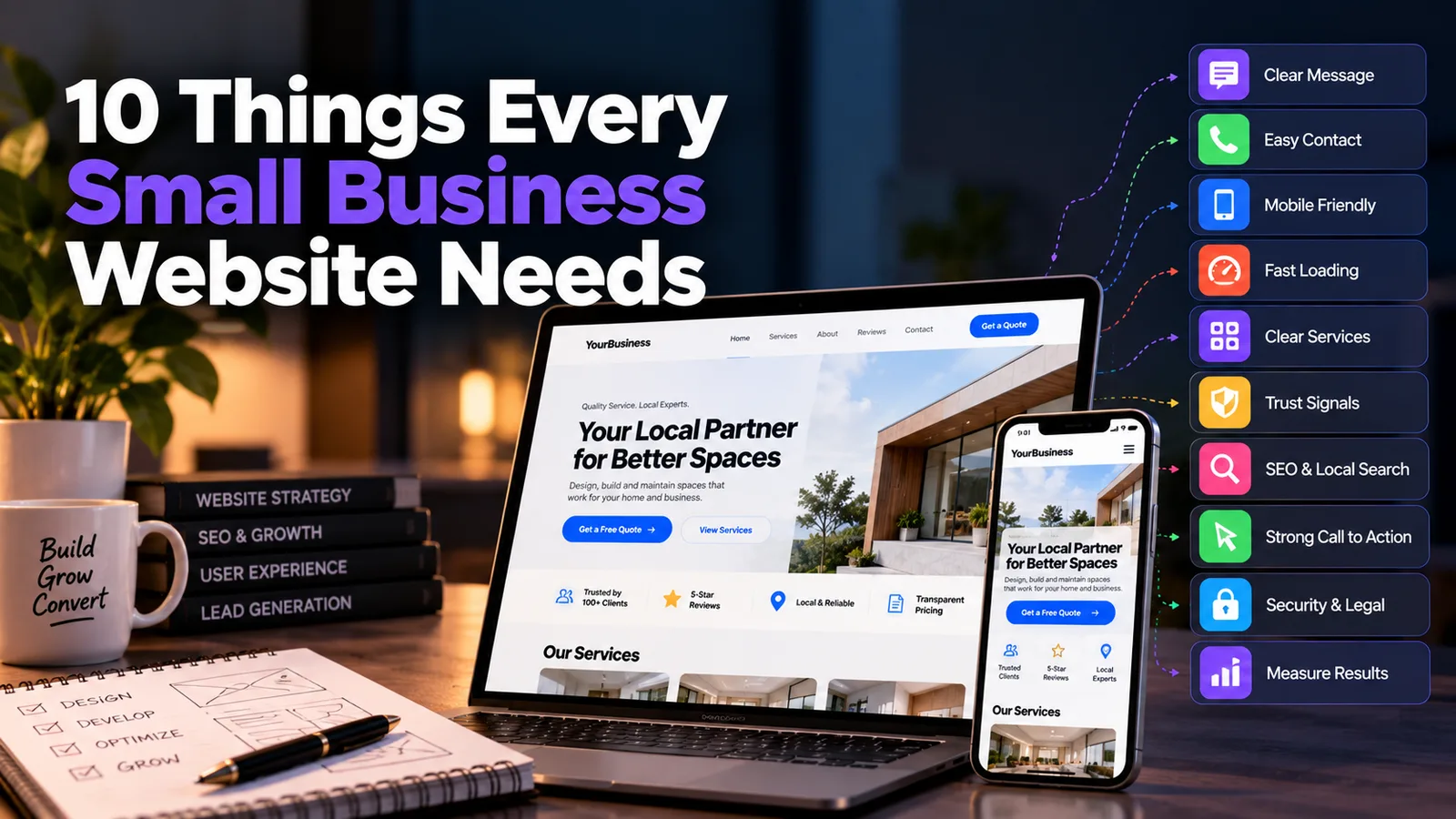
1. A clear message above the fold#
Within about five seconds, a visitor should know what you do, who it is for and where you operate. "Welcome to our website" tells them nothing. "Family dentist in Indore. Same-day appointments." tells them everything.
Put a specific headline, one supporting line and a clear next step at the top of the homepage, before anyone has to scroll.
2. An obvious way to contact you#
The whole point of most small business sites is an enquiry. Make it effortless:
- Phone number visible in the header, and tappable on mobile
- A short contact form (name, contact detail, message - not twelve fields)
- WhatsApp or call button for the people who do not want to fill in forms
- Address and opening hours for local businesses
If someone has to hunt for how to reach you, most will not bother.
3. Mobile-first design#
In India, most visitors arrive on a phone. A site that merely "shrinks" to fit is not the same as one designed for thumbs: readable text without zooming, buttons large enough to tap, menus that work, no sideways scrolling.
Open your own website on a mid-range Android phone on mobile data. That is your customer's experience.
4. Fast loading#
Speed is part of the first impression, and slow pages lose visitors before they have read a word. The usual culprits are huge uncompressed images, too many plugins and cheap, overloaded hosting.
5. Clear services or products#
Say what you offer in plain language, and give each main service its own section or page. Visitors should not have to guess whether you do the thing they came for.
For each service, cover:
- What it is and who it helps
- What the process looks like
- Roughly what it costs, or how pricing works, if you can
- A button to enquire or book
Dedicated service pages also give Google something specific to rank for.
6. Trust signals#
A stranger is deciding whether to give you money or personal details. Help them say yes:
- Customer reviews and testimonials (real names and photos where possible)
- Case studies or before-and-after work that show results
- Logos of clients, certifications or memberships
- A real About page with real faces, your story and your experience
- Transparent policies - pricing approach, refunds, privacy
Generic stock photos of smiling strangers do the opposite of building trust.
7. Basic SEO and local search setup#
You do not need to be an SEO expert, but the foundations must be in place:
- A unique page title and description for every page
- Headings that reflect what people actually search for
- Your city or service area mentioned naturally in the content
- A Google Business Profile, verified and consistent with your website
- Your name, address and phone number identical everywhere they appear
- A sitemap submitted in Google Search Console
For a local business, a well-completed Google Business Profile plus a clear, fast website is often the highest-return marketing you can do.
8. One strong call to action per page#
Every page should point somewhere. "Call now", "Get a free quote", "Book a consultation", "See pricing". When a page has five competing buttons, visitors pick none.
Decide the single most valuable action for each page and make that button stand out. Repeat it at the bottom of long pages so the visitor does not have to scroll back up.
9. Security and legal basics#
A small site can still be attacked, and visitors notice warning signs.
- HTTPS (the padlock) on every page
- Regular updates for your CMS, themes and plugins
- Backups you have actually tested
- A privacy policy, and terms where relevant, especially if you collect enquiries or payments
A browser warning saying "Not secure" on a contact form is an expensive way to lose a customer.
10. A way to measure what works#
If you cannot see what visitors do, you are guessing. At minimum, set up:
- Google Analytics for visits, sources and popular pages
- Google Search Console for search performance and indexing problems
- Conversion tracking for form submissions, calls and WhatsApp clicks
Check them monthly. The aim is simple: find out which pages bring enquiries and do more of that.
The quick self-audit#
| Question | Yes / No |
|---|---|
| Can a stranger say what I do within five seconds? | |
| Is my phone number or enquiry button visible without scrolling? | |
| Does the site work comfortably on a phone? | |
| Does the homepage load in under about three seconds? | |
| Do I have real reviews or case studies? | |
| Does each service have its own clear description? | |
| Is my Google Business Profile verified and matching my site? | |
| Does every page have one clear next step? | |
| Is the site on HTTPS with a privacy policy? | |
| Do I know how many enquiries the site produced last month? |
If you answered "no" to more than three, there is meaningful upside waiting. None of these fixes are exotic, and most can be done in a matter of days rather than months.
Where to start#
You do not need to fix all ten at once. Start with the ones that affect enquiries most directly: a clear headline, a visible contact path, mobile usability and speed. Then build trust, search visibility and measurement on top.
If you would rather have it built properly from the start, or want an honest review of your current site, share a short brief through the project form on this site and we can scope it together.
- small-business
- website-checklist
- seo
- conversion
- web-design
Common questions
What pages does a small business website need?
At minimum: Home, Services (or Products), About, Contact, and ideally a page of reviews or case studies. Add a blog or FAQ when you are ready to publish helpful content that answers customer questions and supports search visibility.
How many pages should a small business website have?
Quality matters more than quantity. Five to ten focused pages is enough for most small businesses. A page should exist because a customer needs it, not to make the site look bigger.
Does my small business really need a website if I have social media?
Yes. Social profiles are rented space, controlled by platforms whose rules and reach can change overnight. A website is the one place you own, where you control the message, collect enquiries and show up on Google.
What is the most important thing on a business website?
A clear answer to three questions within a few seconds: what do you do, who is it for, and what should I do next. If a visitor cannot answer those, nothing else on the page matters much.
How often should I update my website?
Check contact details, services and prices at least every few months, and add fresh content or reviews regularly. Outdated information, such as old prices or a dead phone number, costs trust and leads.
Share this
Instagram has no web share link, so this gives you both pieces: copy the caption, save the card, then post it.
Got this problem too?
Websites, web apps and SaaS products in React and Next.js, with the backend, payments and integrations they need to actually run a business.