ContentCal: from spreadsheet chaos to a marketing operating system
From spreadsheet chaos to an internal marketing operating system
I joined Concept Dash as a graphic designer. The social team wasn't struggling to create content; it was struggling to organise everything around it. Calendars lived in Excel, approvals in conversations, assets in SharePoint, and tasks everywhere else. I built one product to hold all of it, and the team now uses it every day.
Don't just look at the work people are doing. Look at everything around the work that is slowing them down.
- Project type
- Internal marketing operations platform
- Role
- Hired as graphic designer; became product builder, developer and automation designer
- Timeline
- Active and continuously evolving
- Company
- Concept Dash (Canada)
- Users
- About 10-11 people using it daily
- Live site
- contentcalendar.in ↗
- Stack and services
- Full-stack web appRole-based access controlSharePoint APIAI caption generationAI monthly planningSocial publishing APIsGitHub ActionsWeb scraping
The story
I joined Concept Dash as a graphic designer. My job was supposed to be creating content. Working with the social media team, I noticed something else: they weren't struggling to create content, they were struggling to organise everything around it.
- calendars lived in Excel
- approvals lived in conversations
- assets lived in SharePoint
- tasks were scattered across different places
- each region had different content requirements
- events and trade shows had no central workflow
- planning a whole month could become a coordination exercise for one person
What if all of these disconnected workflows lived inside one product?
The real problem
The first problem sounded simple: "we're using too many spreadsheets". Looking closer, the whole marketing workflow had become fragmented.
- 1
Planning
Different regions needed different strategies.
- 2
Platforms
Instagram and LinkedIn needed separate planning views.
- 3
People
Managers, editors and viewers needed different levels of access.
- 4
Approvals
Content needed review before it could move forward.
- 5
Assets
Files were repeatedly pulled from SharePoint and pasted into content cards.
- 6
Tasks
People struggled to see which work was theirs across multiple calendars.
- 7
Research
Trade shows and industry events needed repetitive manual research.
- 8
Publishing and reporting
News and social content had to go out often, and management needed visibility.
- 9
Repetitive writing
Time went into caption drafts and monthly planning that followed predictable patterns.
The calendar was just the visible part of the operational mess.
The first MVP
I started with the smallest useful version: a visual content calendar where posts could be created and moved around easily. I studied how established planning products handle scheduling and built around drag-and-drop cards, calendar-based planning, structured post information, visual status and platform-specific views.
The team responded well, and the MVP immediately raised better questions. Those questions became the roadmap.
Iteration 01: multi-platform calendars
There wasn't one social channel; there were several, Instagram, LinkedIn and eventually multiple regional accounts. Instead of separate systems, I built a unified experience with a platform switcher between account-specific calendars.
One product, multiple marketing environments.
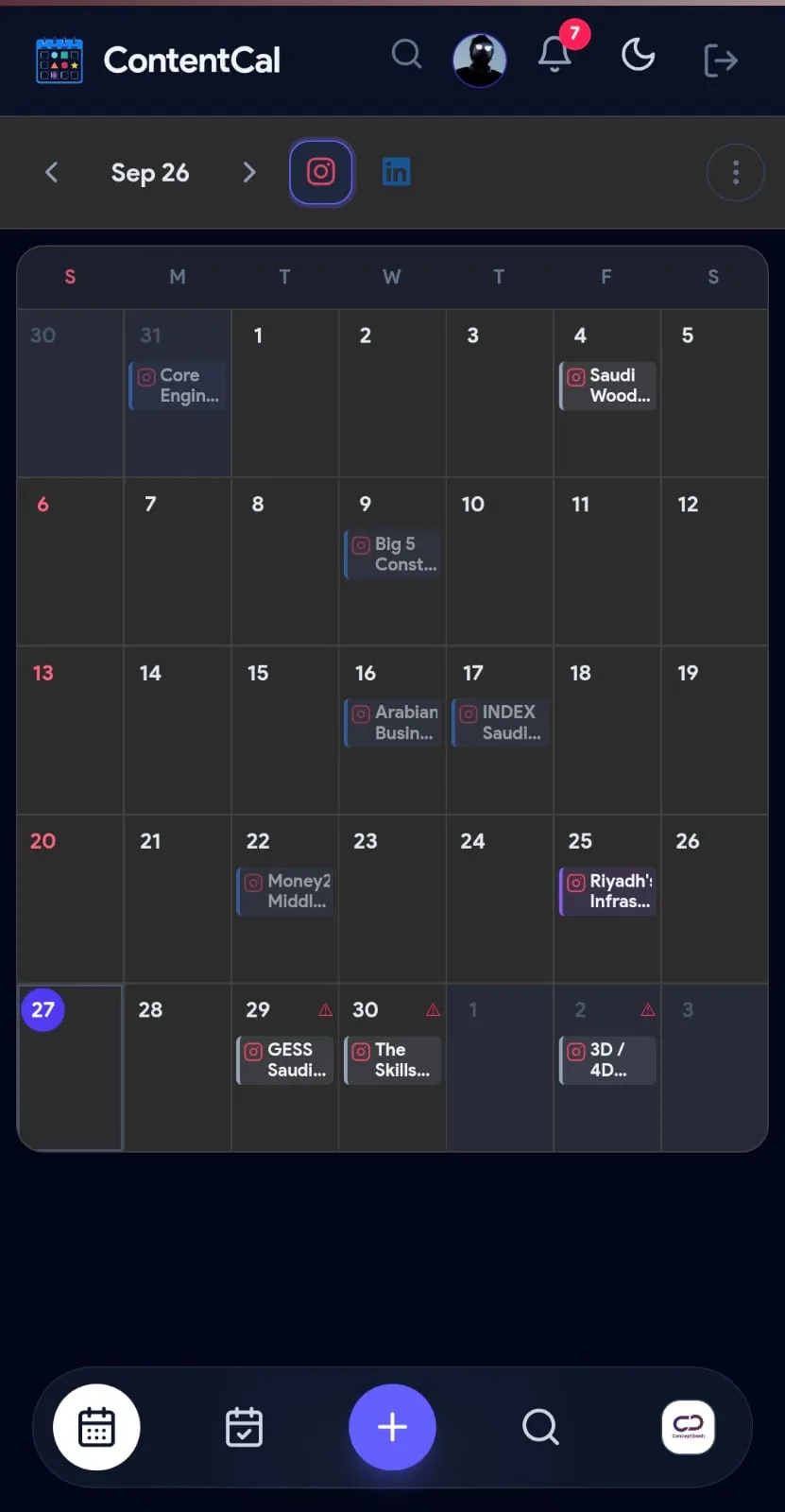
Iteration 02: multi-region workflows
Concept Dash works across regions with different strategies and audiences. I added workspace and calendar switching so one product adapts to each regional workflow instead of pushing the team back into separate spreadsheets.
Regions
- Canada
- Malaysia
- GCC
Within each
- Multiple platform and account combinations
Role-based access
As more people used it, not everyone should be able to do everything. Once the product grew from a personal planning tool into a team system, role-based access control became essential, and role-gated approvals and team governance are now a core capability.
Admin / manager
- Approve
- Control workflows
Editor
- Create content
- Manage content
Viewer
- See information without changing it
The trade-show module
Then I noticed an unrelated workflow. Senior management attends trade shows and industry events, but tracking them was manual: spreadsheets management had to dig through, and event details the content team needed for campaign planning.
Rather than making the researcher re-type an existing spreadsheet, I designed an import workflow. Management gets a shareable public link, so they can review events without an application account.
- Researcher uploads Excel
- ContentCal processes event data
- Structured event database
- Shareable link for management
Automating event research
The next question: why research the same kinds of events by hand every time? I designed an automated workflow that scrapes relevant trade-show and event information and populates the system by region, turning a recurring manual task into an automation problem.
Before
- Search
- Copy
- Paste
- Format
- Repeat
After
- Discover
- Scrape
- Structure
- Populate
Bringing SharePoint into the product
One of the most repetitive parts of the day: content cards constantly needed links to creative assets that lived in SharePoint. It was a textbook case of unnecessary context switching.
So I asked why the user should leave the product to find the asset at all. I worked with the organisation to get access to the relevant SharePoint resources and connected them through APIs, so assets can be reached from inside ContentCal. That removed one of the team's most common tab-switching loops.
- Open ContentCal
- Open SharePoint
- Find file
- Copy link
- Return
- Paste link
- Repeat
My Tasks
With multiple calendars, someone working across the team doesn't want to see everything. They want to know one thing: what do I need to do? I added a My Tasks view that aggregates everything assigned to a person across all calendars, turning the calendar from a planning system into a personal execution system.
Before
- Calendar A
- Calendar B
- Calendar C
- Calendar D
- "Where is my task?"
After
- My Tasks
- Everything assigned to me
AI caption generation
With the operational foundation in place, I asked which parts of content work were predictable enough to automate. Captions were the obvious first candidate. A user describes the post and gets multiple caption variations across different voice directions, then picks the one closest to the brand's tone.
The goal wasn't to remove the content team. It was to cut the repetitive first-draft work.
AI monthly planner
Planning a month across several regions means juggling dates, platforms, campaign objectives, regional strategy, content types, frequency and product launches. I built an AI planning workflow directly into the calendar that turns a natural-language brief into a structured, placed content plan, so nobody starts from an empty month.
A brief can be as simple as: "Create posts for Monday, Tuesday and Friday for the next month. We are launching a SaaS product in this region. Focus on awareness first, then education, then conversion."
- Prompt
- Strategy interpretation
- Suggested content
- Calendar placement
News-to-Instagram automation
The team runs an Instagram news channel that needs frequent updates. News moves fast; graphic production doesn't. So I designed a pipeline that goes from credible sources to a finished post, using predefined visual templates for headline structure, image placement, typography, overlay, gradient and hierarchy, so every post comes out in a consistent format instead of a new design each time.
Scheduled GitHub Actions jobs trigger it on a recurring basis and it publishes through the platform's API.
- Discover credible sources
- Collect information
- Generate structured content
- Apply template
- Create post
- Publish
Scheduled trigger (GitHub Actions)
        ↓
Fetch new information
        ↓
Process / generate
        ↓
Apply template
        ↓
PublishApprovals
As the system grew, publishing couldn't just happen automatically; people needed control. I designed a six-stage content lifecycle with role-gated progression, which gives a clear answer to "who owns this post?" and "can this be published yet?"
- Idea
- Drafting
- Review
- Reviewed
- Scheduled
- Posted
How the product grew
What began as "let's replace our Excel content calendar" became "let's build the operating system for the marketing team", because every feature came from an observed problem, not a predefined roadmap.
- 1
Calendar
Solved planning.
- 2
Roles
Solved access and governance.
- 3
Trade shows
Solved event visibility.
- 4
SharePoint integration
Solved asset context switching.
- 5
My Tasks
Solved personal workload visibility.
- 6
AI captions
Reduced repetitive writing.
- 7
AI planning
Accelerated monthly strategy execution.
- 8
News automation
Increased publishing speed.
- 9
Analytics
Gave management visibility.
Continuous product development
There was never a complete specification. The users effectively shaped the product while it was being built.
- Observe
- Identify friction
- Build
- Put it in front of users
- Collect feedback
- Discover the next problem
- Improve
- Repeat
The architecture thinking
The hardest engineering problem was keeping all these modules connected without a fragmented experience. The product evolved around a small set of shared concepts, and that common data model lets the modules work together instead of becoming isolated mini-apps.
- 1
Workspace
Which business, region or client are we working with?
- 2
Platform
Where will the content be published?
- 3
Content item
What are we creating?
- 4
Task
Who owns the work?
- 5
Asset
Which files support the content?
- 6
Approval
Can it move forward?
- 7
Schedule
When does it go live?
- 8
Analytics
What happened after publishing?
The visible problem was too many Excel sheets. The real one: no single system connected planning, execution, collaboration, assets, approvals and publishing. ContentCal became that layer.
Impact
About 10-11 people use ContentCal daily, and it is embedded in the team's real marketing workflow rather than sitting as a prototype. It helped the team:
- centralise content planning
- reduce context switching
- manage regional calendars
- structure approvals
- surface individual tasks
- integrate asset workflows
- automate repetitive content work
- accelerate planning
- support publishing workflows
- give management more visibility
This wasn't a weekend SaaS built to show off a technology. It was built inside a real organisation, for real users, against real operational problems, by someone hired to make graphics who kept asking "why are we doing this manually?"
My role
My formal title at Concept Dash is graphic designer. My work on ContentCal went well beyond it.
Product discovery
- Finding operational bottlenecks by observing the team
UX / product design
- Workflows
- Interfaces
- User journeys
Development and deployment
- Building and connecting modules
- Taking it into daily use
Automation and AI
- Automated workflows
- AI captions
- AI planning
Integrations
- SharePoint
- Social publishing platforms
Iteration
- Collecting feedback
- Evolving the product continuously
What I learned
- 1
The best roadmap can come from your users
Nobody handed me a 30-feature spec. The team's daily frustrations became the roadmap.
- 2
A feature is valuable when it removes friction
The SharePoint integration mattered not because it used an API, but because someone stopped switching tabs all day.
- 3
Internal tools can become real products
It started as an internal experiment and grew multiple users, workflows, integrations, AI, automation, analytics, permissions and daily usage.
- 4
AI works best inside a workflow
The AI isn't a chatbot beside the product. It sits directly inside planning and content creation, where it removes actual work.
- 5
Product development is continuous
Every solution exposed a new problem. That isn't failure; it's product discovery.
I don't just build what I'm asked to build. I look for what the team is struggling with and build the system that removes the problem.
Have a similar problem? Let's talk.
Kartik Saxena - open to remote roles, contract work and new projects.