Valley of Flavours: canteen ordering and operations SaaS
Turning a paper-based canteen into a digital ordering and operations system
The canteen looked simple from the outside: order at the counter, pay, collect, leave. Up close it was a surprisingly complex workflow running entirely on a paper register. I built a lightweight SaaS that connects the customer, the kitchen and the owner, and the client now pays for it every month.
Observe the workflow. Find the bottleneck. Build the system.
- Project type
- Canteen operations SaaS
- Role
- Product builder and full-stack developer
- Timeline
- Started as a personal experiment; ongoing, evolving product
- Client
- Valley of Flavours
- Users
- Customers and canteen operators
- Stack and services
- SupabasePostgreSQLOffline-first cachingQueued batch syncQR orderingKanban workflowRevenue dashboard
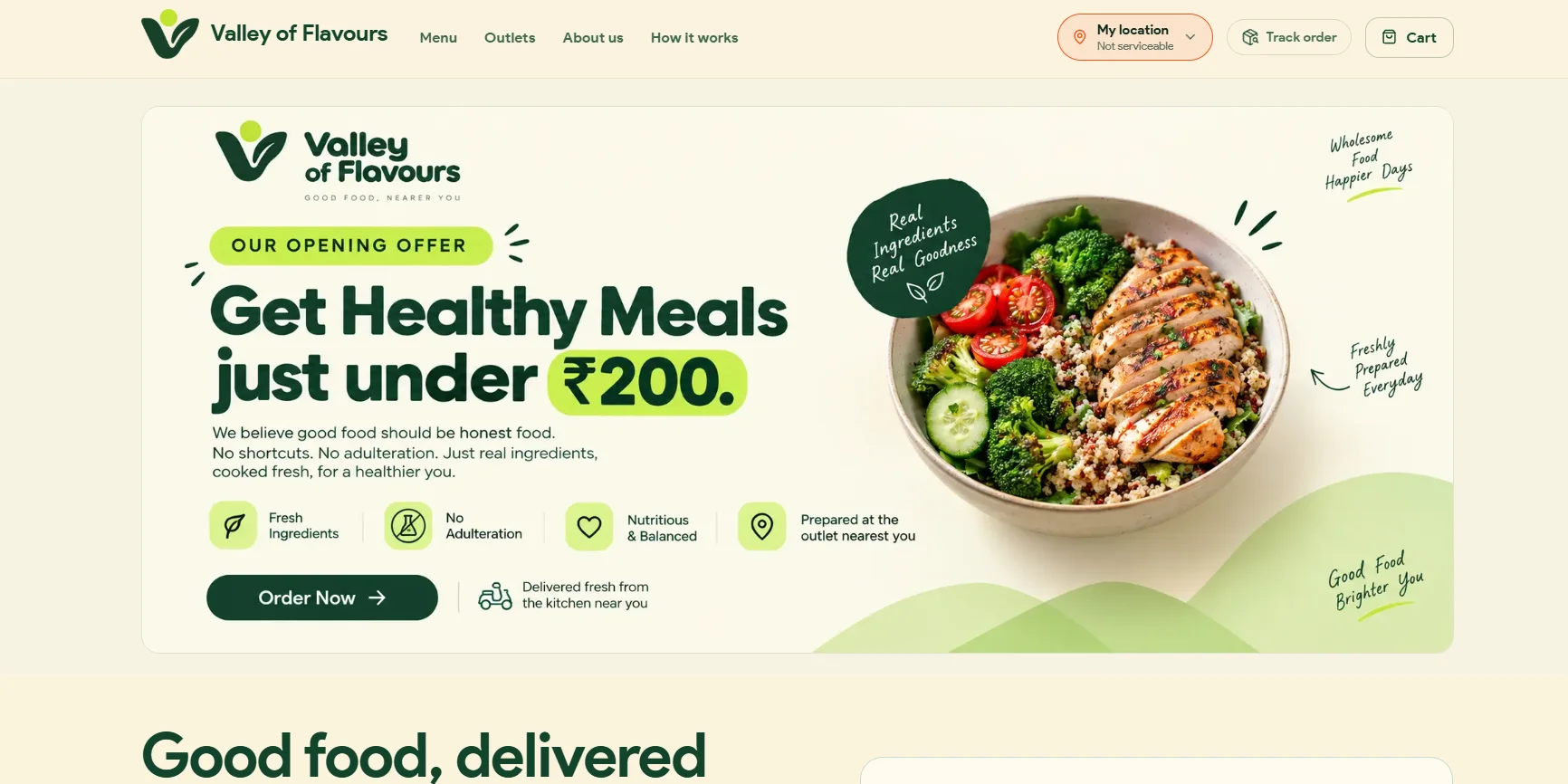
The problem
Once I watched the counter closely, I noticed what was really happening. Orders were written by hand into a register. Payments were sometimes forgotten. Customers kept crowding the counter asking "Bhaiya, mera order ready hua?" ("Is my order ready?").
The operator was juggling all of this at once:
- incoming orders
- handwritten records
- payments
- unpaid balances
- kitchen status
- customer questions
- daily sales
Could the entire canteen operation be turned into a simple digital system?
The first observation
The biggest issue wasn't just ordering. Several connected problems were happening at the same time, on three sides of the counter.
Customer side
- Stand in line
- Order verbally
- Remember the order
- Return to the counter repeatedly
- Ask for status updates
Counter side
- Write every order by hand
- Calculate totals
- Track payments
- Maintain unpaid balances
- Relay to the kitchen
- Answer status questions
Business side
- No revenue tracking
- No view of customer behaviour
- No order-volume monitoring
- No handle on recurring tasks
The problem wasn't one broken feature. It was the entire workflow.
The idea
I decided to build a lightweight SaaS that connected the customer, the kitchen and the operator. Instead of replacing one manual step, the goal was to connect the whole workflow.
- Scan
- Order
- Track
- Prepare
- Pay
- Analyse
Designing the customer experience
I started at the counter. Rather than making customers download an app, I used a QR code as the entry point, something everyone already knows how to use.
- Scan QR
- Open digital menu
- Select items
- Enter name + phone
- Add special instructions
- Place order
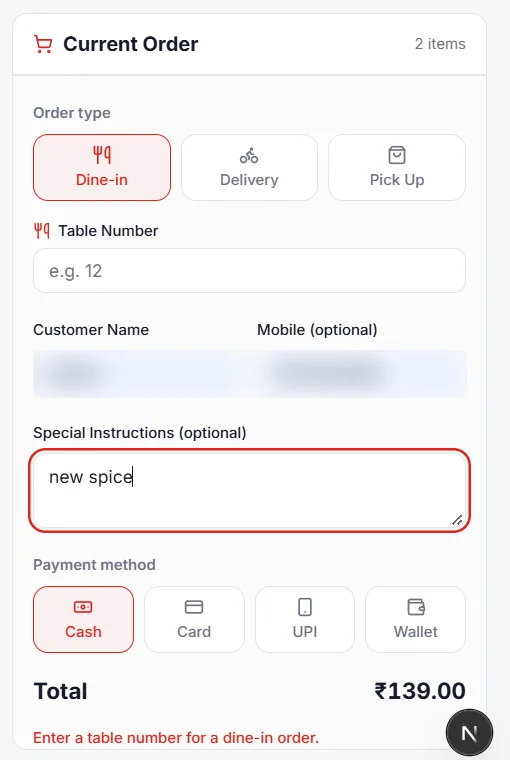
From order to kitchen
Once placed, an order appears automatically in the manager's dashboard. Instead of reading handwritten notes, the operator works from a structured digital queue. Each order carries:
- customer name
- phone number
- selected items
- special instructions
- total amount
- order status
The kitchen Kanban
One of the core interfaces is a Kanban-style kitchen board. The operator moves each order through its stages visually, and the board becomes a shared source of truth between the customer and the kitchen.
- New
- Preparing
- Ready
- Delivered
- Paid
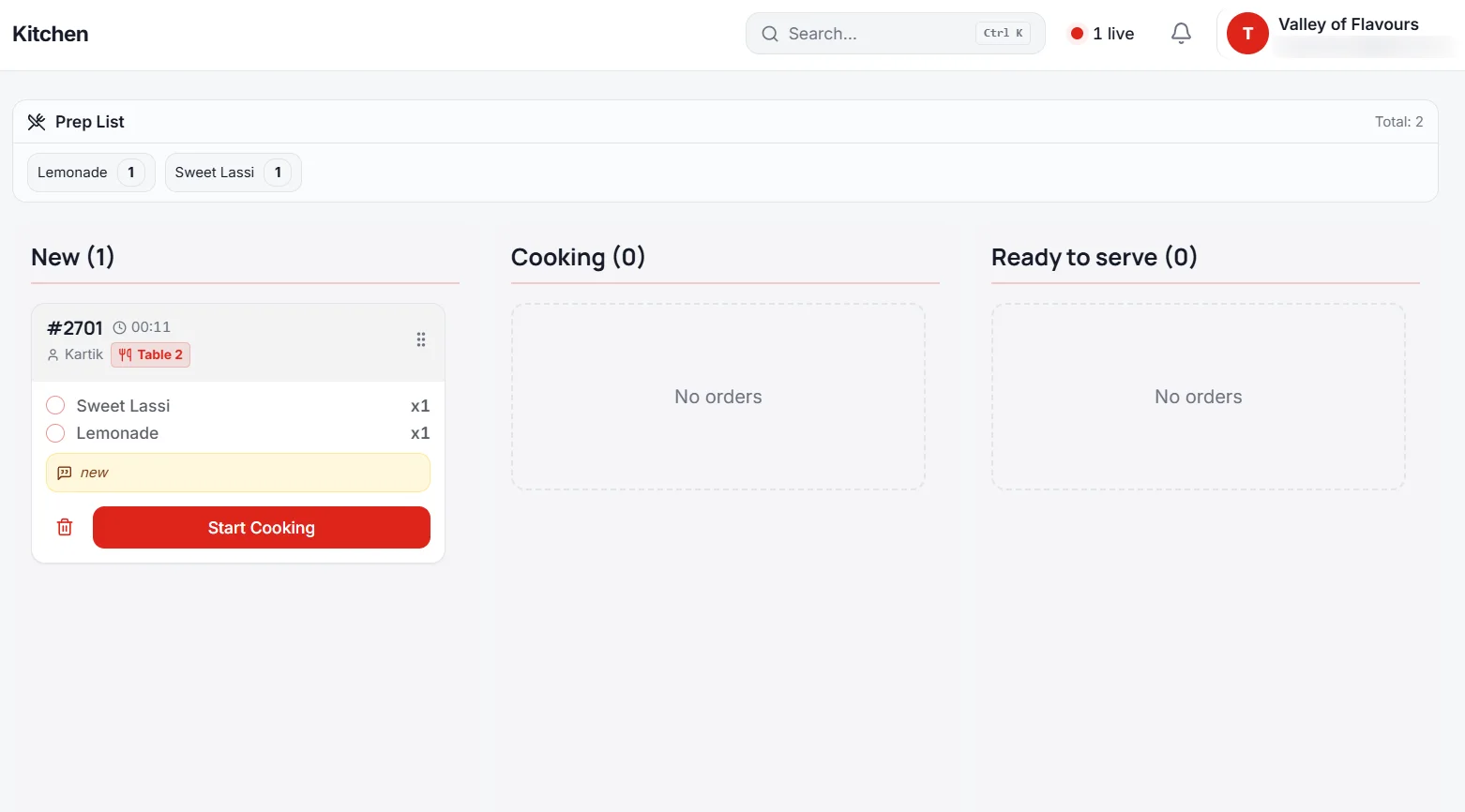
Everyone could see where an order was.
Customer order tracking and notifications
The same order state is exposed to the customer through a tracking link. Instead of walking back to the counter several times, they check the status, which removed a whole category of repetitive questions.
I added a notification layer on top, so a status change reaches the customer without another trip to the counter. The customer shouldn't have to remember to keep checking. It's a small interaction with a surprisingly large operational effect.
- Order received
- Being prepared
- Ready
- Delivered / completed
Payment and ledger
The next problem was money. In the old workflow some customers left without paying, and the operator noted the amount in a ledger by hand.
The software added structured payment tracking and a digital ledger that separates "order created" from "payment completed", giving the operator a clear view of outstanding balances instead of handwritten notes.
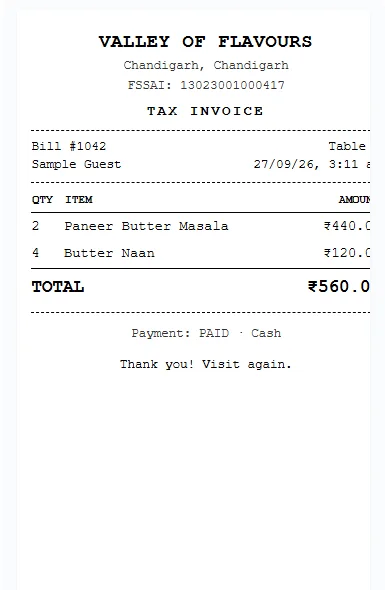
The scaling problem
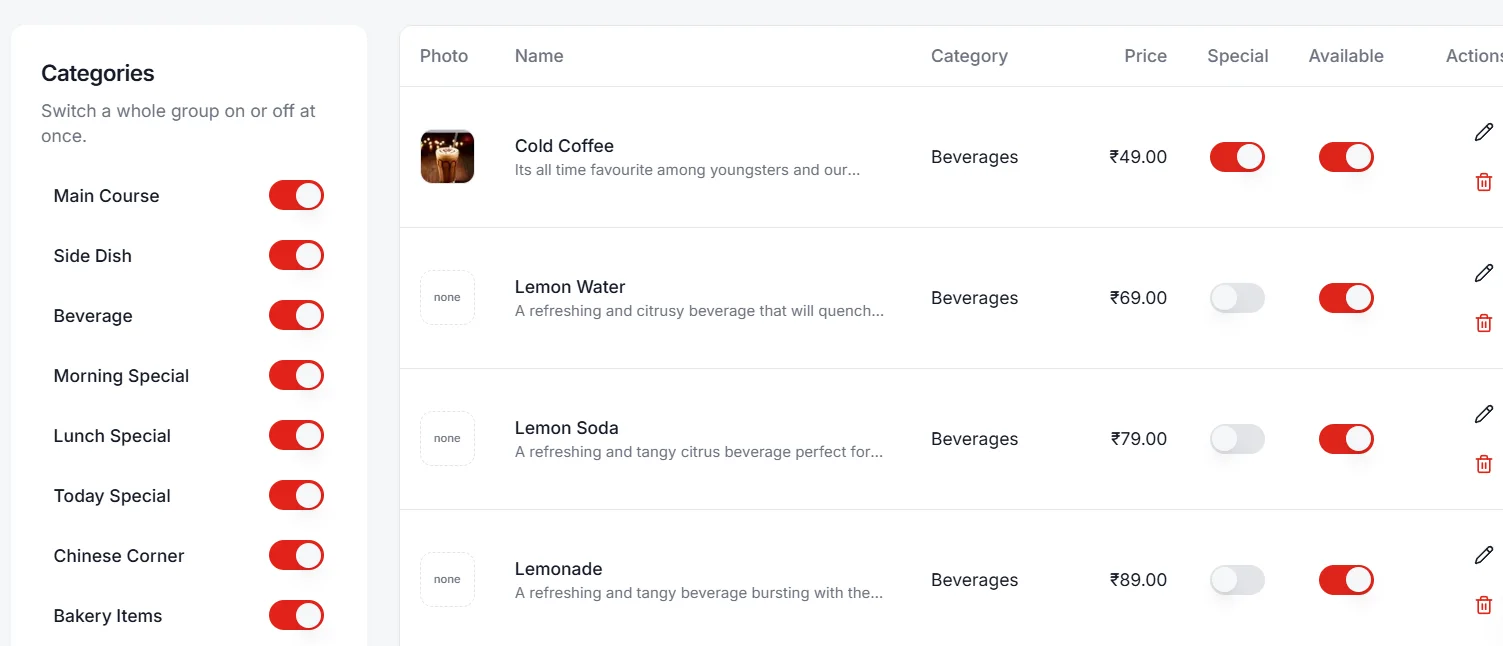
The first version worked. Then real usage exposed a new problem. The menu carried a lot of data, and because this started as an experiment I had kept the setup deliberately low-cost on a free Supabase tier. As customer activity grew, the app generated a large number of database reads and writes. The architecture had to change.
The offline-first shift
Instead of hitting the database for every small interaction, I added a caching and queueing layer and moved the app toward an offline-first approach: keep frequently used data close to the user, and synchronise changes intelligently instead of constantly querying the database.
Menu data is cached locally on both the customer's and the manager's device, and changes are queued and synced in batches. That cut unnecessary database traffic, made the system more resilient to patchy connectivity, and kept the product viable on low-cost infrastructure.
Before: every action hits the database
- Read
- Write
- Read
- Write
- Read
- Write
After: local first, batched sync
- Local action
- Queue
- Batch synchronisation
- Database
Revenue dashboard and customer insights
Once ordering and payment worked, the client asked: "How much business are we actually doing?" The system was already generating the data, so I turned it into a management dashboard with daily, weekly, monthly and yearly revenue.
Order history also surfaces recurring customers and buying patterns. "Who buys the most?" is now answered from real transactions, not guessed from a register.
That changed the product from order-management software into operational and business-intelligence software.
The unfinished idea: dinner opt-in
A cloud kitchen supplied meals at set times, and the operator had to collect the expected number of meals by hand. People sometimes forgot to opt in. I designed the next part of the product around that workflow:
The WhatsApp integration for this workflow was planned but not completed in the version I deployed. That distinction matters: I would rather document what shipped than claim what was only designed.
- Customer opens the app
- Selects dinner
- Participation recorded
- Total visible to operator
- Kitchen prepares the right quantity
Client collaboration
I wasn't building in isolation. I worked directly with the owner, and the loop became continuous product development driven by real use. Each question the client asked turned another manual process into a software workflow: can we have a ledger? track payments? see revenue? manage customers? know how many dinners are needed?
- Build
- Deploy
- Observe usage
- Collect feedback
- Identify the next problem
- Improve
- Repeat
From experiment to paid product
This started as an experiment, but it created enough value that the client began paying for it as a recurring monthly SaaS service, and became a recurring customer for continued development.
A real business was willing to pay to keep using software I built to solve its operational problems.
The complete system
Customer
- QR entry
- Digital menu
- Order
- Tracking
- Notifications
Kitchen
- Order queue
- Kanban workflow
- Preparation
- Completion
Business
- Payments
- Ledger
- Customer records
- Revenue dashboard
- Operational insights
Infrastructure
- Caching
- Local data
- Queued updates
- Batch sync
- Supabase
Before and after
Before: paper register
- Customer arrives
- Waits at the counter
- Orders verbally
- Operator writes the order
- Customer pays, or forgets
- Order enters a manual workflow
- Customer waits
- Customer asks for status
- Operator checks the register
- Customer collects food
- Revenue stays in handwritten records
After: connected workflow
- Scan QR
- Open menu
- Place order
- Digital order created
- Kitchen receives it
- Kanban workflow
- Customer tracks status
- Order completed
- Payment recorded
- Revenue appears in the dashboard
The real problems I solved
It started with one visible problem, manual ordering. Solving it revealed deeper ones:
- 1
Manual order entry
Replaced by a digital ordering interface.
- 2
Counter congestion
Reduced through QR ordering and order tracking.
- 3
Order-status questions
Answered by customer-facing tracking.
- 4
Kitchen coordination
Handled by a visual Kanban workflow.
- 5
Forgotten payments
Caught by structured payment tracking and a ledger.
- 6
High database usage
Cut with local caching, queued updates and batch synchronisation.
- 7
Revenue visibility
Provided by the reporting dashboard.
- 8
Changing requirements
Absorbed through continuous collaboration and iterative development.
What this project taught me
- 1
Good software ideas come from ordinary places
I didn't find this idea on a startup blog. I watched someone write "Chole Bhature - ₹10" in a register and asked: what if this entire page was software?
- 2
Software should adapt to the workflow
There was no perfect spec. Requirements emerged through use, so I built the core, watched the real workflow, and adapted the product around the business.
- 3
Scaling isn't only about more servers
I didn't fix the first performance problem with more infrastructure. I changed the application's behaviour: more work done locally, changes synced strategically.
- 4
Product development is continuous
There was never a single moment it was "finished". Every solution exposed the next problem, and that cycle became the process.
- 5
A working product creates evidence
This isn't a GitHub demo. A real business used it, a real operator gave feedback, a real client paid for it, and it kept evolving.
My role
I built this independently, alongside my full-time role as a research analyst at GreyB.
Problem discovery
- Observing the canteen workflow
- Identifying operational bottlenecks
Product design
- Customer, kitchen and management workflows
Development and deployment
- The application and its infrastructure
- Hosting and maintaining the live system
Performance architecture
- Caching
- Local state
- Queued synchronisation
Analytics
- Revenue reporting
- Customer insights
Client collaboration
- Collecting feedback
- Continuously adapting the product
Impact
- 1
Operational
Less dependence on handwritten order management.
- 2
Customer experience
Customers order and track food without repeated trips to the counter.
- 3
Business visibility
The operator has structured transaction and revenue data.
- 4
Technical
The system handles higher activity without constant database reads and writes.
- 5
Commercial
The experiment became a recurring paid SaaS relationship with the client.
Don't start by asking what technology to use. Start by asking where people are wasting time.
Have a similar problem? Let's talk.
Kartik Saxena - open to remote roles, contract work and new projects.