In short
Sales teams spend their days copying contacts out of tools, checking whether a lead is real, and chasing them by hand. A normal CRM stores what people type in, and does none of that work.
A CRM built around a prospecting agent. Phase one finds and verifies leads with Claude through MCP and web search. Phase two runs outreach by email and WhatsApp. Phase three handles calling, recordings and analysis. Everything is split by region and rolled up into one overview.
I have been thinking about sales tools, and about the part of them that bothers me: most of them are a place to type things in.
A sales CRM is usually built as an operations app. You record a lead, you log a call, you move a card. That is useful, but the person still does all the work. They find the contacts, check if they are real, write the message, make the call and then type up what happened.
I want to design it differently: as a prospecting agent that happens to have a CRM attached.
The idea#
Instead of a form-driven app, the heart of the system is an agent that does the legwork of finding, checking and reaching leads. A person stays in charge of judgement and relationships. The agent handles the repetitive parts.
I think of it in three phases, and I want the product itself to follow the same structure: a sidebar with a group of modules for each phase.
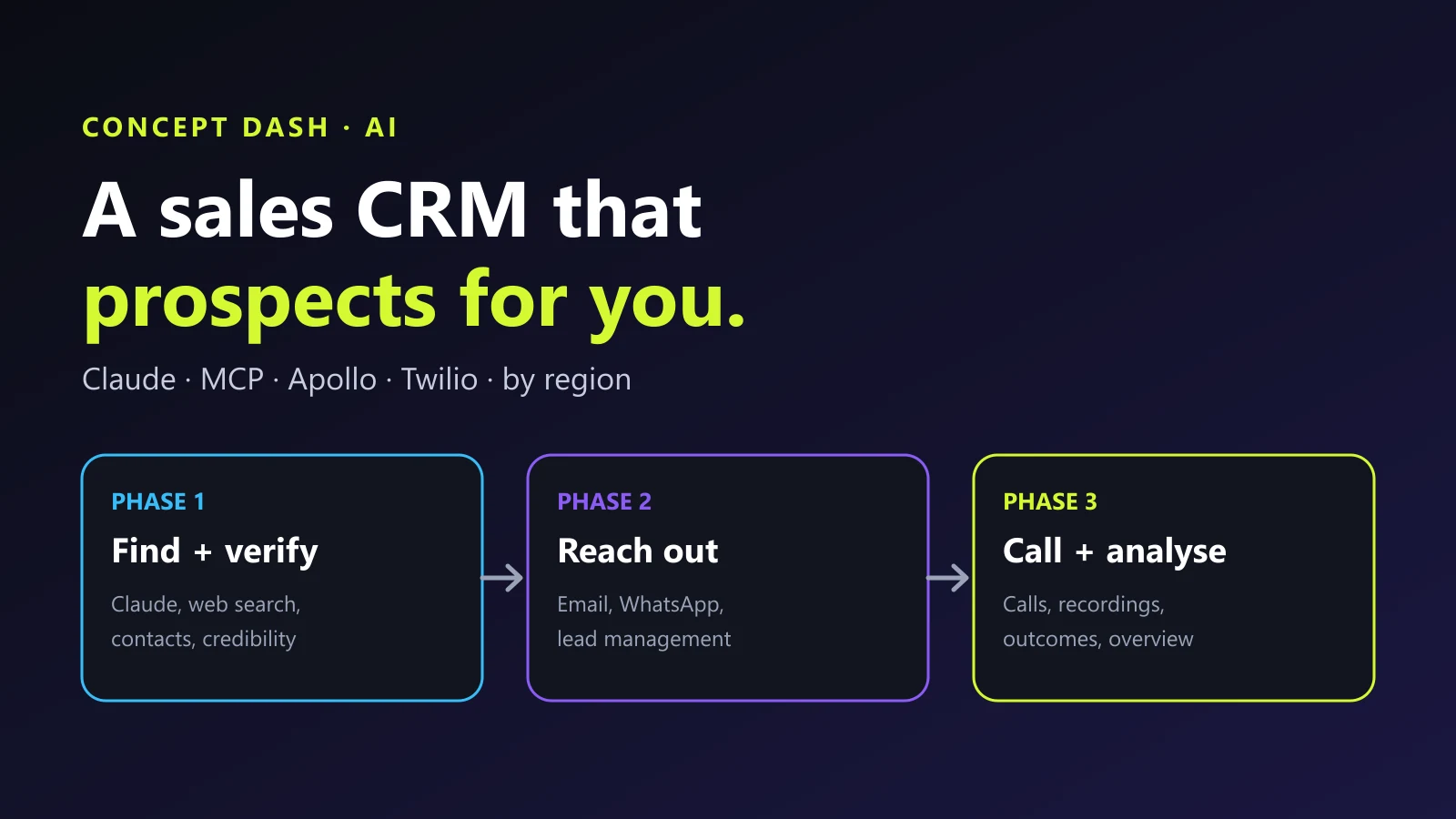
Phase 1: find and verify the leads#
The first phase is data. It would be a set of four or five separate modules, all about getting good leads into the system.
Claude through MCP. I would give the agent an MCP connection so Claude can search and work with the lead data directly, instead of someone exporting a spreadsheet and importing it somewhere else.
Web search and crawling. I would give it a web search API (Brave Search is an example) and a crawling service (Firecrawl is the kind of tool I mean) so it can search the open web and read company pages. That is how it finds out what a company does and who works there.
Contact data through MCP. Contact providers such as Apollo can also be connected through MCP. The agent pulls the contacts in, so nobody has to keep exporting from Apollo and pasting into another tool.
Credibility checks. This is the part I care about most. The agent should not just collect names, it should judge them: is this a real person at a real company, and is the information from a source I can verify? Only then does it become a lead.
A fallback. If the data is missing, a person can still use LinkedIn to look the contact up and add it.
Phase 2: outreach and lead management#
The second phase is about managing the leads and reaching them.
- Lead management: is this a lead or not? Qualify it, tag it and keep its status current.
- Email outreach: send email through the company's own mail setup, such as Google's email service over SMTP, so outreach comes from a real company address.
- Files: connect Microsoft SharePoint so the team's documents, such as decks and proposals, are available inside the workflow.
Phase 3: calling, recordings and analysis#
The third phase is the one that makes it feel like a real sales platform.
Calling and WhatsApp. I would connect Twilio for WhatsApp messaging and for calling automation, so the team can message and call a lead directly from the platform.
Recordings and analysis. Calls would be recorded, and the system would look at them: was this a feasible lead, what was the outcome, and how many of my calls led to something? Across a whole team, that turns "I think the calls are going OK" into numbers.
Organised by region#
I would divide the whole thing by region. Leads, outreach and results are each grouped by region, because every region has its own language, time zone, rules and market. It also makes results comparable: which region responds, and which does not.
One overview#
On top of all three phases sits an overview of the whole platform: how many leads came in, how many were reached, how many calls happened, and what came out of them. In one view you can see how the sales pipeline is really working.
A sales platform, with code and automation#
The point is to solve the sales pipeline with code and automation, so people stop doing the same thing over and over, like pulling contacts out of a tool and typing them into another one.
I also see it as something I could offer to other companies as a SaaS product, not only a tool for my own team.
It starts simple. The base is a plain, text-driven system, and the integrations are what make it powerful. I can add more later.
What I would be careful about#
A system that finds people and contacts them at scale is easy to misuse, so I am designing around the rules from the start:
- Consent and anti-spam laws. Email, WhatsApp and calling are regulated, and the rules differ by country. Opt-in, do-not-call lists and unsubscribe handling are not optional.
- Recording consent. In many places you must tell people a call is being recorded, or get their permission.
- Website terms. Crawling and search have terms of service. Respect them.
- Data quality. An agent that confidently adds wrong contacts is worse than no agent. Verification and a person reviewing the lead list matter.
- People stay in the loop. The agent can suggest and prepare. A human should decide who gets contacted, and what is said.
Where this fits#
This is the same approach I keep returning to: figure out what already exists, connect it, and let an agent do the repetitive part. I wrote about the mindset and used the same pattern to automate our trade shows and to design a company brain.
I will update this post as the build progresses. If you want an agent-driven sales or outreach system for your own team, designed with the compliance in mind, share a short brief through the project form on this site and we can scope it together. You can also read about the AI automation service or browse more case studies.
- ai-agents
- automation
Common questions
How is this different from a normal CRM?
A normal CRM is a place where people record what happened. This design puts an agent in front of it: the agent finds leads, checks them and suggests the next action, and the CRM keeps the record. The work moves from the salesperson to the system.
What does the MCP part do?
MCP lets Claude use your tools. Connect a contact database or your own CRM through MCP and Claude can search it, add to it and update it as part of a conversation, instead of someone exporting and importing lists.
Why split the system by region?
Regions differ in language, time zone, rules and market. Dividing leads and campaigns by region keeps outreach relevant and makes results comparable between regions.
Can you automatically call and message people?
Technically yes, with a telephony and messaging provider. Legally and ethically it depends on the country: opt-in, do-not-call rules, recording consent and anti-spam laws all apply. Design for compliance before you design for volume.
Is this a finished product?
No. This is the initial design and plan. I am sharing the thinking now and will update the post as it gets built.
Share this
One click opens LinkedIn with a ready-written post: a hook, the short version of this guide and the link. The caption is also copied, so you can paste it if it does not appear.
Instagram has no web share link, so this gives you both pieces: copy the caption, save the card, then post it.
Keep reading
How I Automated Trade Show Tracking With a Second MCP Server (Claude Searches, ContentCal Fills the Calendar)
Part 3 of the ContentCal story: how a dedicated MCP server lets Claude research trade shows by region, build the sheet and load it into ContentCal, plus a public page where stakeholders add the shows they attend.
Building a Company Brain: A RAG Chatbot That Remembers Every Project
How I am designing CD Brain, a smart RAG chatbot for Concept Dash: company data turned into embeddings, stored in a vector database, new project data saved as memory, and meeting notes and emails turned into live project timelines.
How I Connected Claude to Our Content Calendar With MCP (and Stopped Burning API Tokens)
Part 2 of the ContentCal story: why the Claude API budget ran out, why a local LLM was not the answer, and how an MCP server let Claude plan and create a whole month of content calendar posts.
Got this problem too?
Automation that takes repetitive work off a team: document pipelines, AI-assisted content, automatic social publishing and scheduled jobs.