In short
Trade shows had to be entered into ContentCal by hand, again and again. Scraping them was the obvious fix, but scrapers get blocked, break often and return data nobody fully trusts. Meanwhile, nobody knew which shows our stakeholders were attending.
A second MCP server, built only for trade shows. Claude researches events by region with its own web search, builds the sheet and loads it through the ContentCal connector. A public page lets stakeholders add the shows they attend, which creates a card on the right regional calendar and emails the workspace owners.
This is part 3. In part 1 I described how ContentCal grew into the marketing team's operating system, including its trade-show module. In part 2 I connected Claude to the calendar with MCP. This post is about the next use for MCP: finally removing the manual work around trade shows.
The problem: trade shows were entered by hand#
Our marketing team needs to know which trade shows and industry events are coming up, by region. In ContentCal, that lives in the trade-show section, described in part 1.
But someone still had to put the events in. Again and again, someone searched, copied, pasted and formatted. The trade shows were in the system, but they got there by hand.
First idea: scraping, and why it is a trap#
In part 1 I already described the obvious fix: automate event research by scraping. Search, scrape, structure, populate.
Scraping looks great on a whiteboard and is painful in practice:
- Roadblocks. Websites put up bot protection and block automated visitors, and your scraper simply stops getting pages.
- It breaks. A site changes its layout and the scraper returns nothing, or the wrong thing.
- Weak credibility. What comes out is whatever the page said, with no judgement about whether it is a real, relevant event.
A scraper is something you have to keep fixing. I wanted something that behaved like a researcher.
The fix: a second MCP server, just for trade shows#
In part 2 I set up an MCP server so Claude could work with the calendar. For trade shows I set up a second MCP server, built only for this job.
Claude already has its own web search in the Claude app. So the flow became:
- I ask Claude for the trade shows for a region and period.
- Claude runs its own web search, as a person would, and works out which events are real and relevant.
- It builds the results into a sheet.
- The sheet goes into ContentCal through the connector, straight into the trade-show section.
- The events fill in by region.
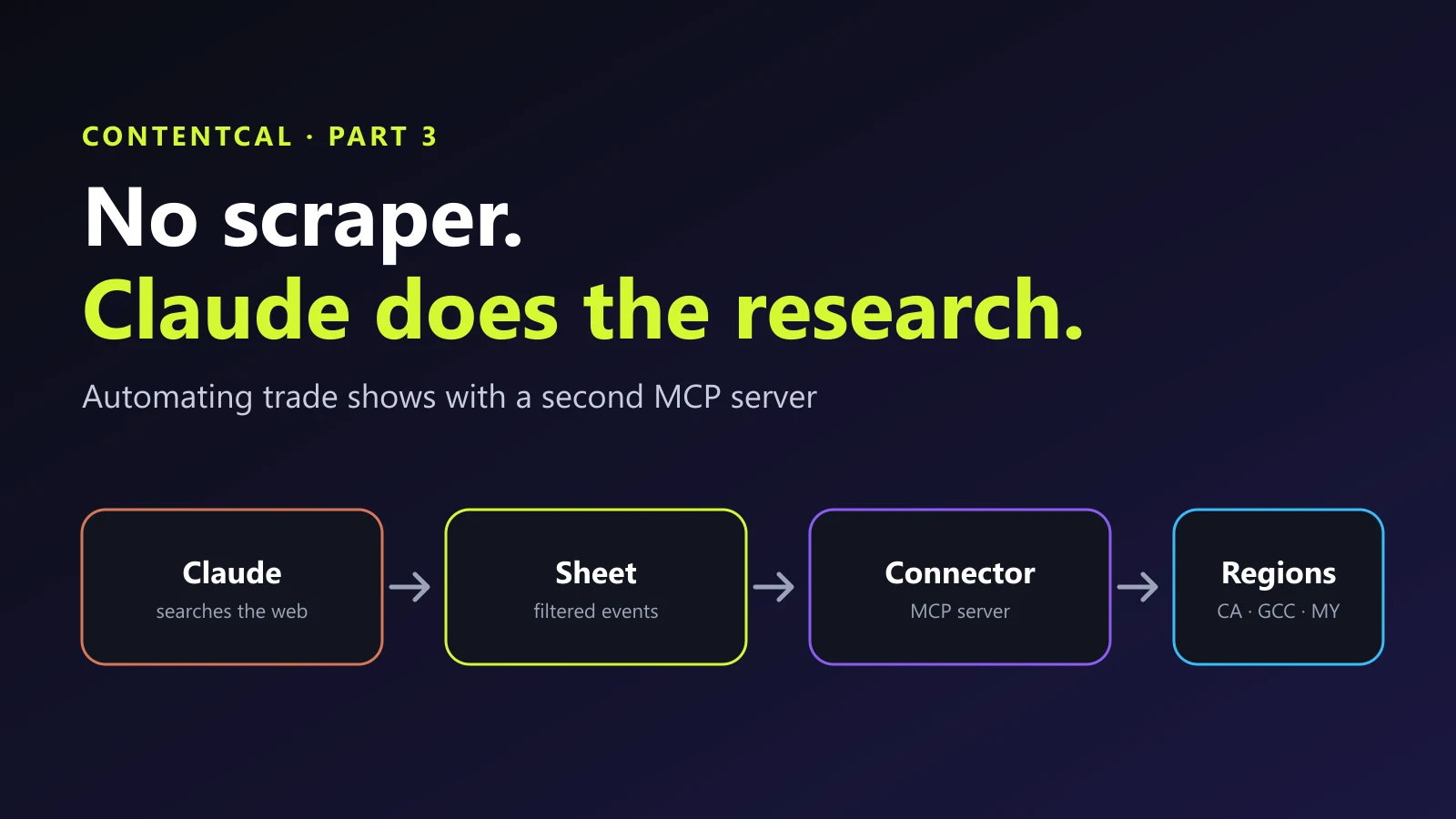
The tools on this server are small and specific: add trade shows, check what is already there, remove trade shows, and read the trade-show context for a workspace. Nothing else.
Claude decides what looks genuine#
The part I like most is the filtering. Claude does not paste in everything it finds. It judges whether each event looks genuine, using things like an official website, dates, a venue and an organiser, and only then loads it.
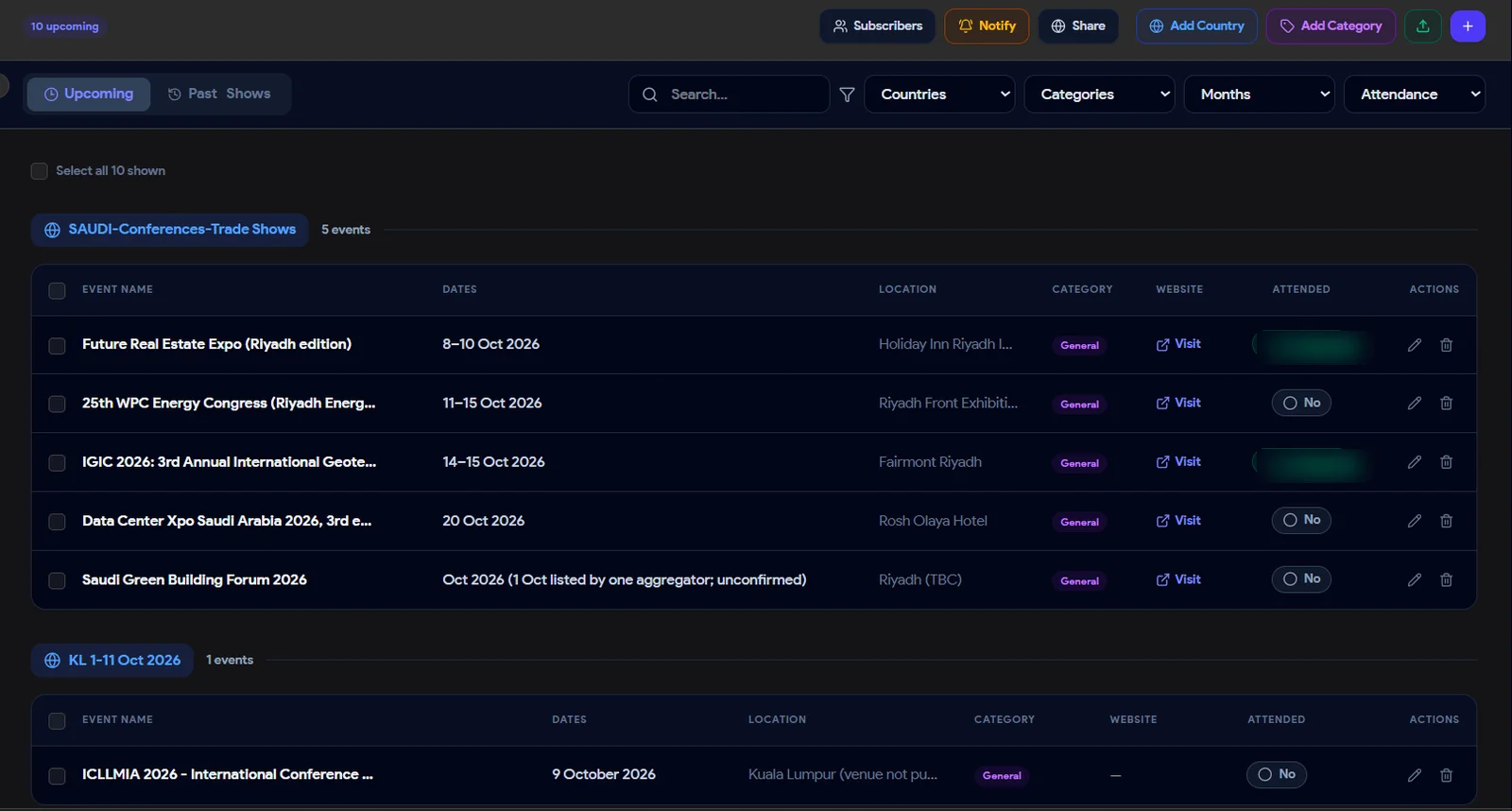
You can see it in the module above. The Saudi Green Building Forum is loaded with its month and city marked as to be confirmed, and a note that one aggregator lists a single date and it is unconfirmed. An event that cannot be verified still arrives, but it arrives flagged instead of looking certain.
That judgement is not perfect, and I would not pretend it is. Treat the loaded events as a first pass, and spot-check anything important before building a campaign around it. The difference is that the list arrives already filtered, instead of arriving as raw search results.
The second problem: nobody knew who was going where#
There was another gap. Our stakeholders attend different shows, and we usually did not find out until after the fact. Which meant we could not plan their posts in time.
So I built a public page.
- It lists the regions, for example Canada, GCC and Malaysia.
- A stakeholder picks their region and says which show they are attending.
- Each region is connected to its own calendar grid: Canada to Canada, GCC to GCC, Malaysia to Malaysia.
No ContentCal account is needed to use it, which is the point: the people who know where they are going should not have to learn a tool.
What happens when someone submits#
Once a stakeholder says they will attend a show, the rest happens automatically:
- A card is created on the public grid for that region.
- The post for the show is added to the calendar, with its image assets.
- The workspace owners get an email, through the email server I already had, saying who is going to which show.
So the owners learn about it immediately, with the details, and the content is already on the calendar to plan around.
The whole workflow, end to end#
Put together, the trade-show workflow now runs like this:
| Step | Before | Now |
|---|---|---|
| Finding events | A person searched and copied | Claude researches by region |
| Checking they are real | Left to the person | Claude filters, a person spot-checks |
| Getting them into ContentCal | Typed in by hand | Sheet loaded through the connector |
| Knowing who attends | Found out later | Stakeholders add themselves on a public page |
| Telling the owners | Messages and chasing | Automatic email |
| Posts and image assets | Created separately | Added automatically |
Nobody retypes a spreadsheet, and the information arrives by itself.
What to be careful about#
- Review what Claude loads. A good filter is not a guarantee. Keep a person at the review step.
- Keep the tool list short. The trade-show server can add, check and remove trade shows, and nothing else. Do not give it more than the job needs.
- A public page is public. Think about what you expose and what a stranger could submit, and decide how you want to handle that.
- Keep the servers separate. One focused server per job is easier to reason about than one server that does everything.
Why this is a good MCP use case#
Trade shows are a great fit for MCP because the work is repetitive, the data is on the open web, and the answer needs judgement, not just copying. A scraper is good at the first two and bad at the third. Claude is the opposite.
If you have a manual research or data-entry job that keeps landing on one person, and you want Claude connected to your own tool in a safe, narrow way, share a short brief through the project form on this site and we can scope it together. You can also read about the AI automation service or browse more case studies.
- claude
- ai-agents
- automation
Common questions
Why not just scrape trade show websites?
Scraping fights the websites. Many sites block automated visitors, pages change layout and break the scraper, and the data you get back is only as good as the page it came from. It is a maintenance job that never ends.
How does Claude find the events without a scraper?
Claude has its own web search in the Claude app. Through the MCP server it is told which region and period to cover, it searches the web the way a person would, and returns the events in a structured sheet.
Can Claude tell if a trade show is genuine?
It makes a judgement from what it finds: an official site, dates, a venue, an organiser. That is a useful filter, not a guarantee. Treat the loaded events as a first pass and spot-check anything that matters.
What stops the calendar filling up with wrong events?
The sheet goes in through a small set of controlled tools, and the events land in the trade-show section where people can review and remove them. Keeping a person in the loop at the review step is the safety net.
Why a separate MCP server instead of adding to the first one?
The calendar server handles planning and posts. Trade shows are a different job with different tools and a different risk. Keeping them separate means each server has a short, focused list of tools.
Share this
One click opens LinkedIn with a ready-written post: a hook, the short version of this guide and the link. The caption is also copied, so you can paste it if it does not appear.
Instagram has no web share link, so this gives you both pieces: copy the caption, save the card, then post it.
This shipped as
ContentCal: from spreadsheet chaos to a marketing operating system
SaaS
Keep reading
How I Connected Claude to Our Content Calendar With MCP (and Stopped Burning API Tokens)
Part 2 of the ContentCal story: why the Claude API budget ran out, why a local LLM was not the answer, and how an MCP server let Claude plan and create a whole month of content calendar posts.
How to Give Claude Its Own WhatsApp Number (An AI Agent That Books Appointments)
Step-by-step: get a dedicated WhatsApp number, let Claude Code write the integration, send and receive messages, and build an AI agent that answers customers and books appointments 24/7.
Building a Company Brain: A RAG Chatbot That Remembers Every Project
How I am designing CD Brain, a smart RAG chatbot for Concept Dash: company data turned into embeddings, stored in a vector database, new project data saved as memory, and meeting notes and emails turned into live project timelines.
Got this problem too?
Automation that takes repetitive work off a team: document pipelines, AI-assisted content, automatic social publishing and scheduled jobs.