In short
The old Concept Dash website lagged, nobody could tell where anything was, there were no pages for our areas of expertise, the landing page was tiny and there was no SEO work at all. It could not show what the company actually does or be found by the people looking for it.
Rebuild it around structure: a page and URL for every expertise and every project, web-optimised images, a fuller landing page with the beaver mascot, and two sister sites for PMO and Digital Twin linked back to the main site.
A company website is often the first place a customer, a recruit or a partner looks. If it is slow, confusing or impossible to find, it quietly costs you. This is the story of how we rebuilt the Concept Dash website, what was wrong with the old one, and what we changed, step by step.
What was wrong with the old website#
The old site did its job badly, in four ways:
- It lagged. The interface was slow and heavy, and the experience of using it was poor.
- Nothing was clear. A visitor could not tell where anything was or what the company actually did.
- There were no expertise pages. Our areas of expertise had no home of their own, so there was nothing to explain them, or to rank.
- The landing page was tiny and there was no SEO. It said very little, and nothing had been done to help search engines understand or find the site.
A site like that cannot show your work or be found. It is a brochure no one can pick up.
The rebuild, step by step#
1. Give every expertise and every project its own URL#
The biggest structural change was the simplest idea. Each expertise got its own page and its own slug, and so did each project.
This matters for two reasons. For visitors, it means there is a clear place to read about one thing. For search engines, it means each page can be about one subject, so it can show up in search for that subject, instead of one crowded page trying to rank for everything.
2. Optimise every image for the web#
Heavy images are one of the most common causes of a slow site. Every image was optimised for the web, which reduces how much a page has to download and makes it load faster.
3. A new look for the landing page#
The landing page was too small to say anything, so we rebuilt it with a fuller structure and a new look, and brought our beaver mascot into it. A hero section opens the page, and each section below it answers a question a visitor has.
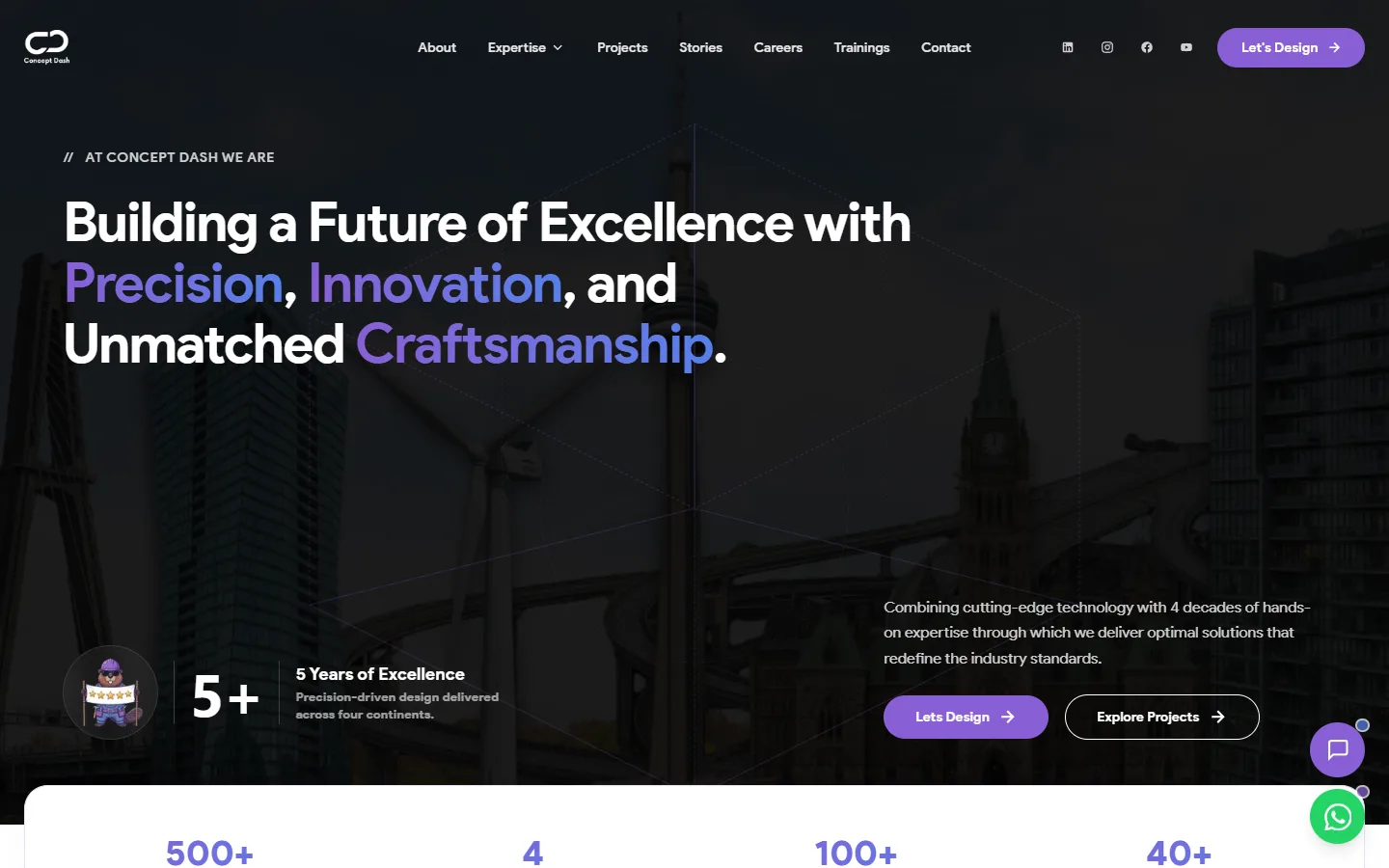
Notice the navigation. About, Expertise, Projects, Stories, Careers, Trainings and Contact: a visitor can see in a few seconds what exists and where to find it. That clarity was the main thing the old site lacked.
4. Build the sections the site was missing#
Beyond the hero, we added the sections the site had never had:
- An expertise section that scrolls automatically, so visitors see the full range without clicking through.
- Website banners in the page to highlight key offers and work.
- Career pages, so the people we want to hire can find us.
5. A 3D model for showcase#
We added a 3D model to the site. It does two things: it makes the site feel modern, and it gives us a base to show 3D and digital-twin work properly, in a way a flat image cannot. When a client opens the site, it is a better showcase of what we can build.
6. Two sister websites: PMO and Digital Twin#
We also designed and deployed two separate websites for two of our services:
- PMO: pmo.conceptdash.ca
- Digital Twin: digitaltwin.conceptdash.ca
Both are linked from the main website, conceptdash.ca, so they work together as one company.
On the PMO site, we added a section that shows a real project in progress, with its costs laid out day by day. A claim that a PMO keeps projects under control is easy to make. A page that shows the daily numbers is much more convincing.
Before and after#
| The old website | The new website | |
|---|---|---|
| Speed | Laggy interface | Optimised images, faster loading |
| Clarity | No clear structure | Clear navigation and sections |
| Expertise | No pages | A page and URL for each one |
| Projects | No pages | A page and URL for each one |
| Landing page | Tiny | Full hero and sections |
| SEO | None | Per-page structure and optimised images |
| Showcase | Flat | 3D model and sister sites |
| Careers | Nothing | Career pages |
The interface is far more defined than it was.
The effect on search#
Rebuilding the structure is what makes SEO possible. With a page for every expertise and project, optimised images and a clear layout, search engines have much more to read and understand, and visitors have far more to find.
After the changes, the site moved up in search rankings and its online presence grew. The honest way to measure it is Search Console: look at impressions, clicks and average position over time, and compare the period before the launch with the period after.
What to take from this#
- Structure comes first. Give every service and project its own page before anything else.
- Fix speed with images. Optimising images is one of the cheapest big wins.
- Make the navigation obvious. If a visitor cannot find something in seconds, it does not exist.
- Give distinct services their own sites when it helps. Link them back to the main site.
- Measure. Search Console shows what actually changed.
If your company website is slow, unclear or invisible in search, share a short brief through the project form on this site and we can scope a rebuild together. You can also read about the website design and development service or browse more case studies.
- web-design
- seo
- web-development
Common questions
Why does giving every service and project its own URL help SEO?
A search engine ranks pages, not websites. If all your expertise lives on one page, that page has to compete for every topic at once. A separate page per expertise and per project can target one subject each, and each one can appear in search on its own.
What did you do about the old site's lag?
Mostly images and structure. Every image was optimised for the web, which cuts the amount of data a page has to load, and the new pages were built to render quickly instead of loading everything at once.
Why build separate websites for PMO and Digital Twin?
They are distinct services with their own audiences. A dedicated site lets each one explain itself in full, while links to and from the main site keep them connected as one company.
How do you know the SEO work paid off?
Search Console is the honest answer: it shows impressions, clicks and average position over time, page by page. Compare the period before the launch with the period after it, and look at the pages you changed.
Can I do this without rebuilding the whole site?
Often, yes. Giving each service its own page, compressing images and fixing the landing page are changes you can make one at a time. A rebuild makes sense when the structure itself, not just the content, is the problem.
Share this
One click opens LinkedIn with a ready-written post: a hook, the short version of this guide and the link. The caption is also copied, so you can paste it if it does not appear.
Instagram has no web share link, so this gives you both pieces: copy the caption, save the card, then post it.
This shipped as
Concept Dash company website
Client Websites
Keep reading
One Website, Three Domains: How We Launched Malaysia and GCC Without Building Two More Sites
How Concept Dash expanded into Malaysia and the GCC with conceptdash.my and conceptdash.ae pointing to routes on one site, each with its own brand tokens and language, so one person maintains one codebase.
10 Next.js SEO Tips for Developers
Ten Next.js SEO tips: metadata, sitemaps, canonical URLs, structured data, image optimisation and avoiding the 'crawled, currently not indexed' trap.
Website Design vs Website Development: What's the Difference?
Website design is how a site looks and feels; website development is how it works. Learn the difference, who does what, and which one your business needs.
Got this problem too?
Websites, web apps and SaaS products in React and Next.js, with the backend, payments and integrations they need to actually run a business.